At my day job working on the domain.com.au website, my team looks after the Find An Agent microsite, a directory of the real estate agents and agencies that are on our platform.
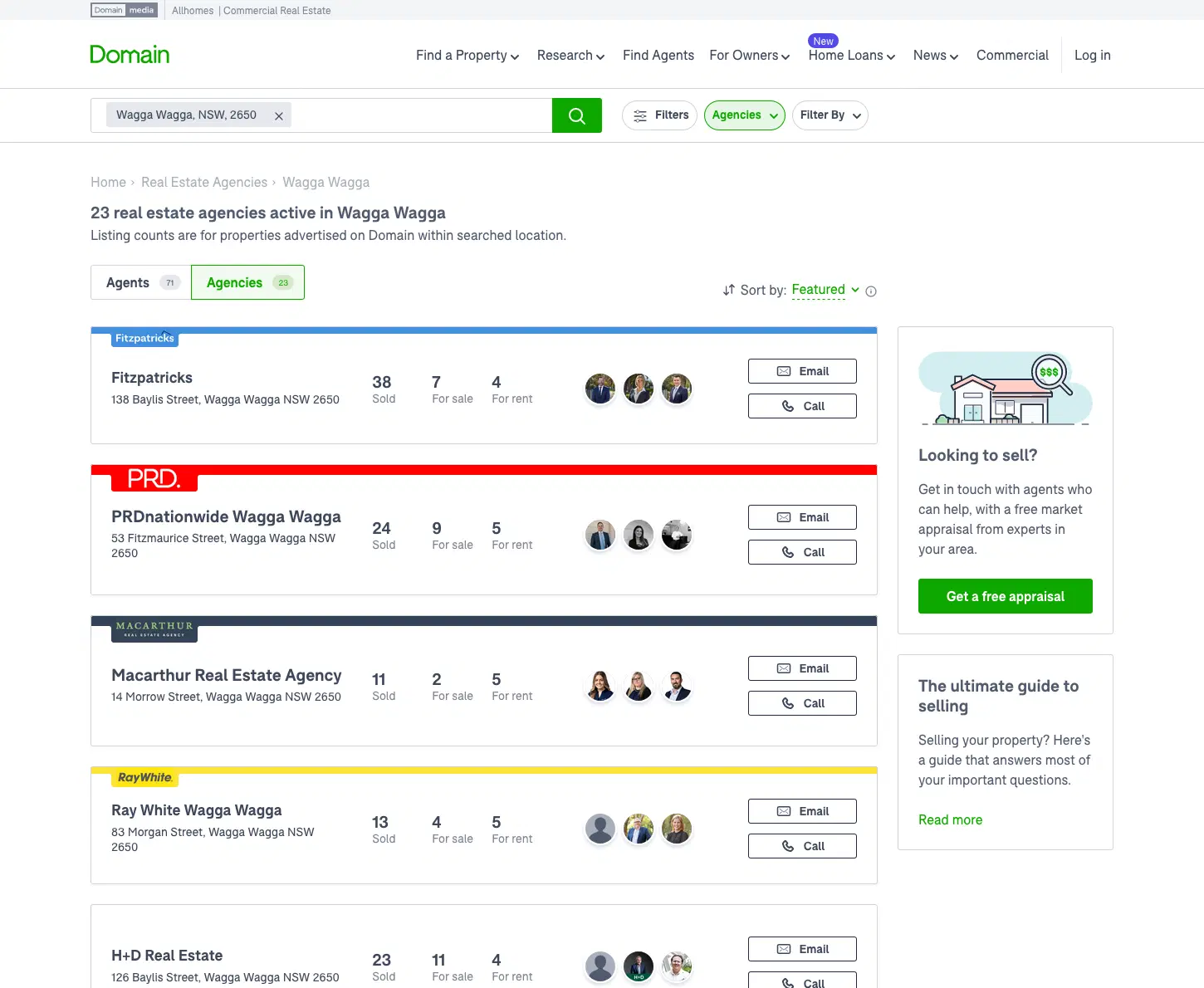
Around 2020 we wanted to adopt GraphQL, as the engineering team looked to scale up a company graph, and we took the opportunity to rethink the front end architecture of the microsite.
At the outset of the project, the microsite was set up as a React web application built with NextJS. Our existing architecture involved server-side page controller functions which made requests to several upstream APIs, composing the data into a page level object which was then passed down to the React page component. From there, the data was passed down as React props to various child components of which the page was comprised.
We decided to adopt an approach to migration whereby we would:
- Break each web page down into components
- Define each component's data requirements as a GraphQL fragment
- Iteratively compose the web page from the components/fragments
This approach was intended to allow us to adopt GraphQL progressively, with individual components going to production one-by-one rather than needing to complete a full migration of the entire web page, while also:
- Organising the front end codebase into a more orderly and developer-friendly structure
- Adopting Typescript and auto-generating types from the GraphQL schema using GraphQL codegen
- Creating Storybook demos for each component, documenting each component's UI variations
Breaking the pages down into components
We started with a full design process where we revisited the layout and content of the existing Find An Agent pages. We created design files contain all the different permutations and three different screen sizes of the pages, and were intended to be a source of truth for confirming how the web pages should look.
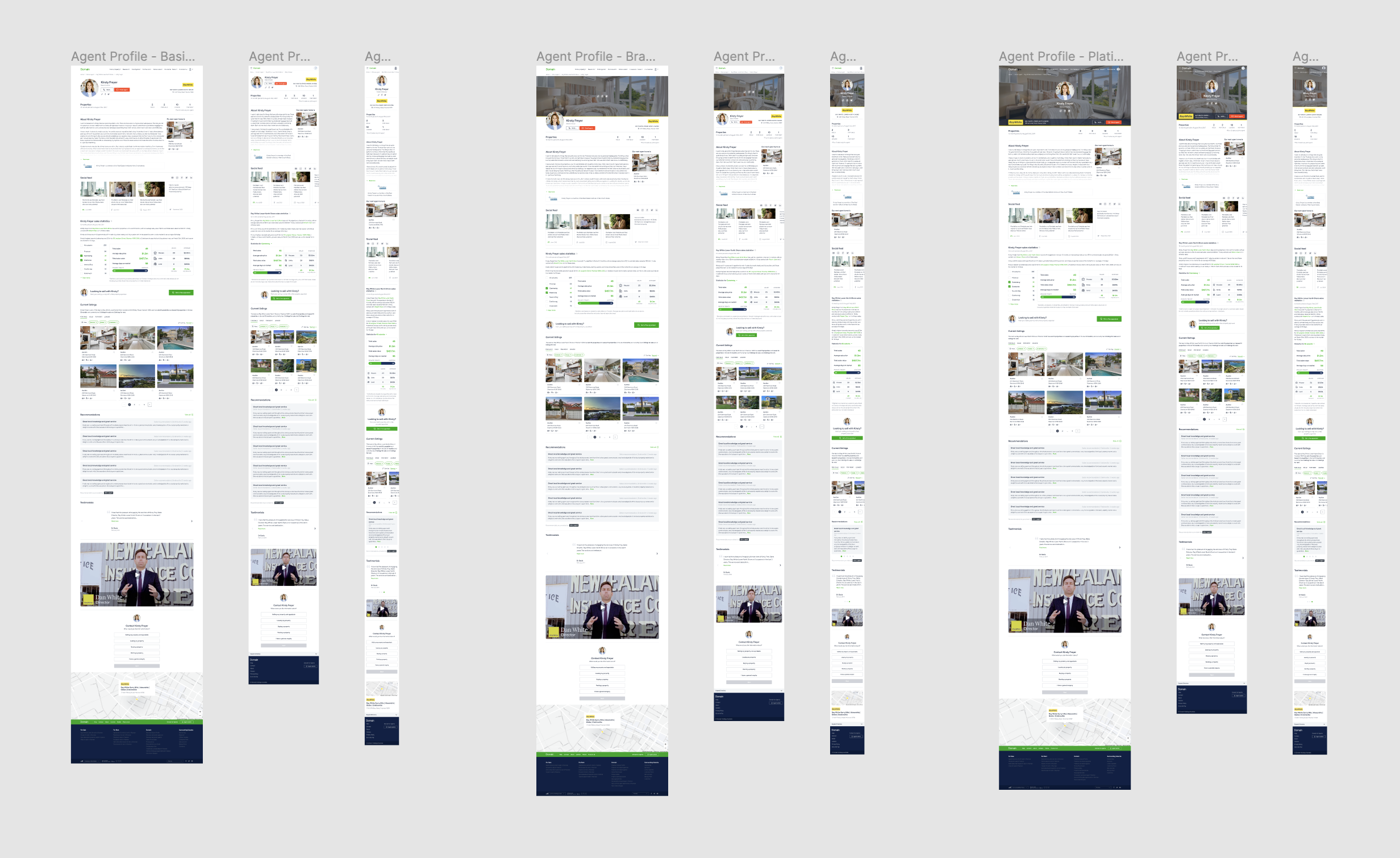
Permutations (Basic/Branded/Platinum) of the Agent Profile page
To build the front end, we broke each of these page layouts down into smaller sections or components. The guiding principle here was that each component should represent a distinct portion of the page that we could consider independently of other functions/content. In our front end codebase, we then built each of these components as distinct React components.
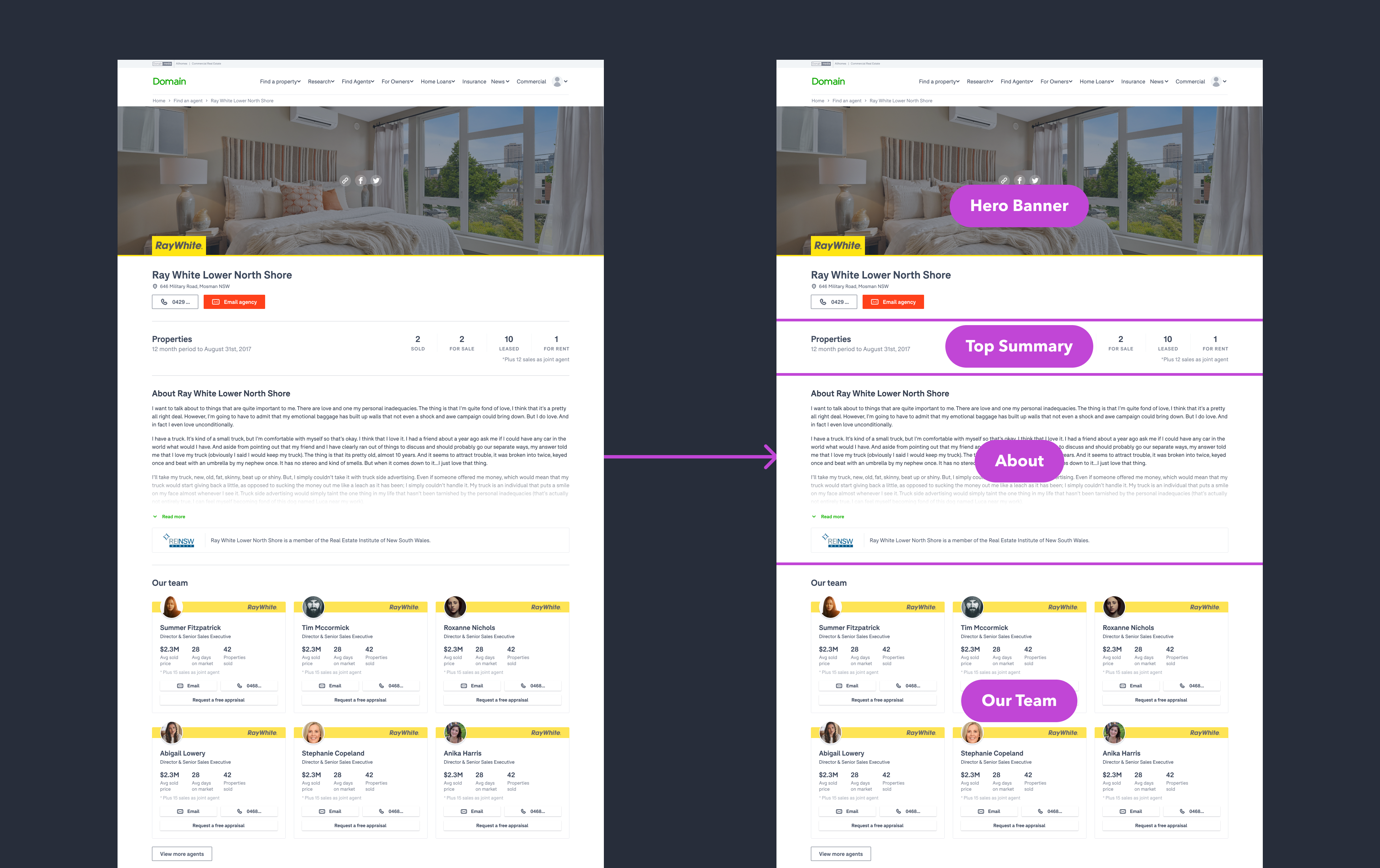
“Branded” agency profile page broken down into components
Defining each component's data requirements
Our previous architecture involved having server-side page controller functions which made requests to several upstream APIs, composing the data into a single page level object which was then passed down to the React page component. This data would then have significant "plumbing" to map the data down to the tree of page components. This was partially an aspect of the architecture we wanted to change, as their was significant complexity to this mapping which could be difficult to trace when making changes to the web pages.
With our new approach, rather than attempting to define the entire page’s data requirements, we could identify what data that specific component required to render and function. We would then document the data requirements for that component as a GraphQL fragment - a piece of the GraphQL schema which had all the data we needed.
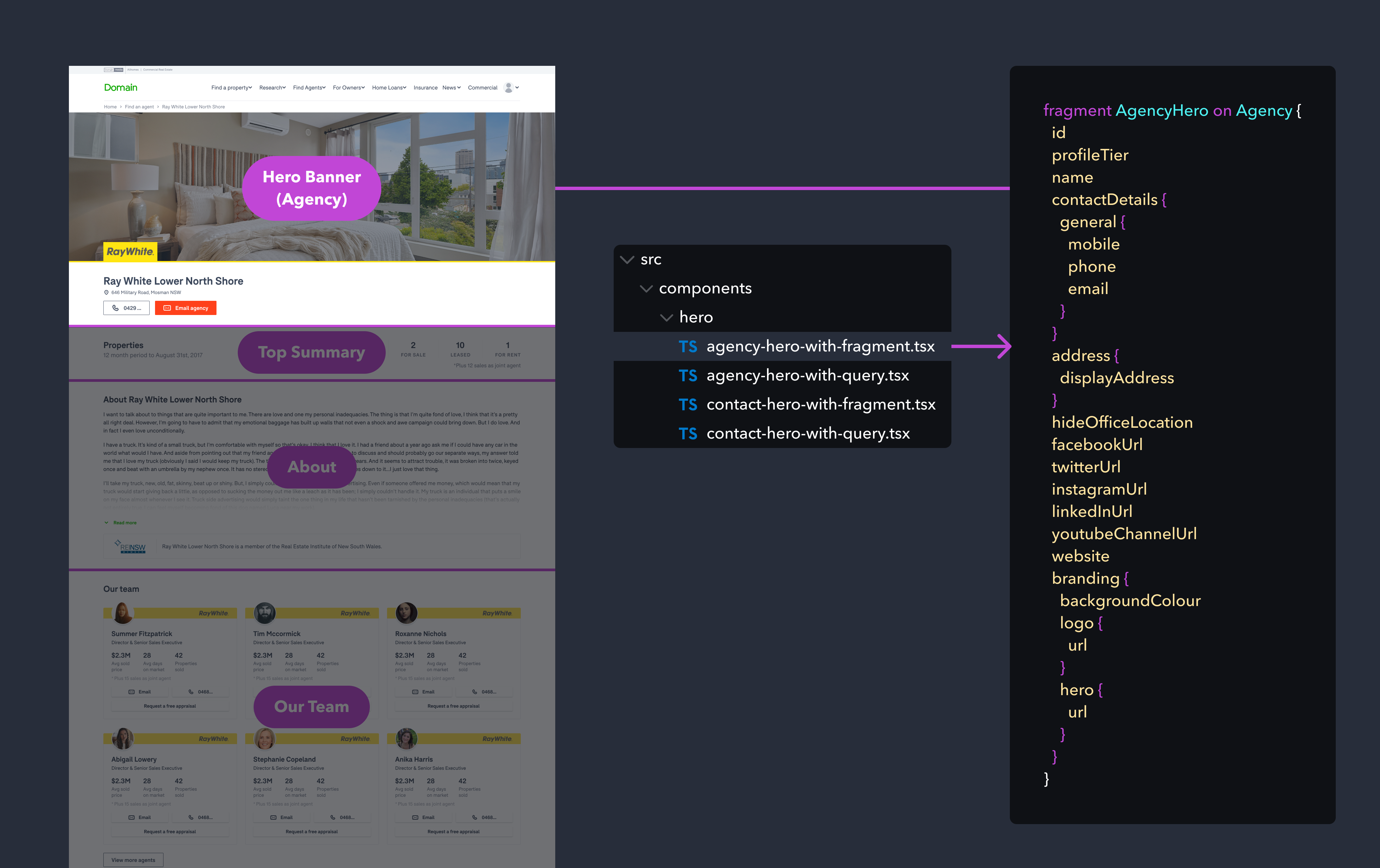
Agency hero banner fragment example
Each React component we created was exported in two variations:
- With Fragment: These versions of the component use their GraphQL schema fragment with Apollo’s useFragment utility function.
useFragmentnever triggers network requests of its own, instead the hook returns an up-to-date view of whatever data the Apollo cache currently contains for a given fragment. This means it relies on a query having been made which has already populated the cache with the required data, which is the basis of our optimised architecture that we will cover in the next section. - With Query: This variation composes the fragment into a GraphQL query, and uses Apollo’s useQuery utility function to perform data-fetching (eg. handling making a HTTP request to the GraphQL endpoint). This variation of the component is self-sufficient in that it can basically be dropped on any page which has an Apollo Provider already configured and immediately work ✨, although each component’s data request will be independent - so it isn’t optimised to minimise over-fetching.
These components would take in as React props the bare essential data points needed for that particular query/fragment (e.g. the agencyId for identifying the particular real estate agency).
const { complete, data } = useFragment({
  from: {
    __typename: 'Agency',
    id: agencyId,
  },
  fragment: FRAGMENT,
  fragmentName: 'AgencyHero',
});
We also use GraphQL Codegen to generate the Typescript types for each GraphQL fragment, giving us a significant improvement in type-safety in our React front end code.
As mentioned earlier, we also took the opportunity to create Storybook demos and create some unit tests, documenting all the different variations of each component. A nice benefit of having the "with query" versions of the components is that we could also easily set up Storybook demos of the individual components which actually sourced live data from our Staging GraphQL schema, without even having to compose them into a full web page.
Composing the component data into a full page query
For each page type (e.g. agency profile page) we then have a React page component which composes the UI out of those smaller components, while also composing the data requirements for the page out of the component data fragments.
In these page components, we import each of the section components and their GraphQL fragments needed to render the page, and then we compose a larger GraphQL query from the schema fragments to collate the data requirements for the whole page. For example:
export const AGENCY_PROFILE_QUERY = gql`
  query getAgencyProfile($agencyId: Int!) {
    agency(agencyId: $agencyId) {
      ...${AgencyProfileHeaderWithFragment.fragmentName}
      ...${AgencyProfileFooterWithFragment.fragmentName}
      ...${AgencyHeroWithFragment.fragmentName}
      ...${AgencyTopSummaryWithFragment.fragmentName}
      ...${AgencyAboutSectionWithFragment.fragmentName}
    }
  }
  ${AgencyProfileHeaderWithFragment.fragment}
  ${AgencyProfileFooterWithFragment.fragment}
  ${AgencyHeroWithFragment.fragment}
  ${AgencyTopSummaryWithFragment.fragment}
  ${AgencyAboutSectionWithFragment.fragment}
`;
We then have a single GraphQL query which has all of the required data to render the entire page. Because we use Apollo/GraphQL, de-duplication of data points that are used by multiple components happens automatically. Then all we need to do is perform the assembled page query to get the data for our entire page:
const { data, loading, error } = useQuery(AGENCY_PROFILE_QUERY, {
  variables: { agencyId },
  errorPolicy: 'all',
});
Because the fragment variations of the components use the useFragment utility, they read their data from the Apollo cache. The only props we need to pass to each component is the required identifiers that are needed for the fragment (i.e. the agency ID which is used as the fragment ID).
return (
  <>
    <AgencyProfileHeaderWithFragment agencyId={agencyId} />
    <AgencyHeroWithFragment agencyId={agencyId} />
    <AgencyTopSummaryWithFragment agencyId={agencyId} />
    <AgencyAboutSectionWithFragment agencyId={agencyId} />
    <AgencyProfileFooterWithFragment agencyId={agencyId} />
  </>
);
By doing this, we essentially optimised the page’s data fetching, as we are able to consolidate all of the page’s major data-fetching requirements into one single request per page.
Supporting server-side rendering
We made a decision early on that we would endeavour to build the website with isomorphic rendering capabilities, as a way to meet our SEO requirements as well as to enable the fastest possible user experience.
This meant we would server-side render the HTML for the pages, performing data-fetching on the server-side so that all the page content was available pre-rendered immediately on page load, but also the same data-fetching could be performed client-side if needed, so if the user navigated to another page within the microsite, for example, a round-trip to the server would not be required - the browser could simply request the needed data and re-render the page client-side.
With this in mind, we needed to have a data-fetching paradigm which would work both on the server as well as on the client. To do this, we decided to use Apollo’s getDataFromTree to allow us to perform the page queries on the server.
The getDataFromTree function takes your React tree, determines which queries are needed to render them, and then fetches them all.
We use this function within the NextJS getServerSideProps function for each page, creating an Apollo client server-side which is used for that server run. Then we add the extracted Apollo client state to the NextJS page props which are passed to our client-side code.
export const getServerSideProps = async ({ req, res, query }) => {
  const apolloClient = initializeApollo(); // Creates an Apollo client to be used server-side
  const agencyId = query?.agencyId;

  try {
    // Perform selected GraphQL queries server-side
    await getDataFromTree(
      <ApolloProvider client={apolloClient}>
        <App agencyId={agencyId} />
      </ApolloProvider>,
    );
  } catch (error) {
    logger.error('GraphQL SSR error\n', error);
  }

  // Extract Apollo client cache state and pass it down as NextJS page props
  return addApolloState(apolloClient);
};
In our client-side code (in the NextJS app file), we then “hydrate” the Apollo cache.
// in _app.js
export default function App({ Component, pageProps }) {
  // Use the cache state that was passed down from getServerSideProps and
  // create a client-side apollo-client with this cache
  const apolloClient = useApollo(pageProps);

  return (
    <ApolloProvider client={apolloClient}>
      {/* The rest of the props get passed to the component like usual */}
      <AgencyProfilePage {...pageProps} />
    </ApolloProvider>
  );
}
This enables the isomorphic nature of our front-end architecture - the client app now has access to the Apollo client and all the data fetched on the server, and can perform subsequent requests to the GraphQL API completely client-side.
Benefits and downsides
By breaking down each page type into smaller components, and taking a stepped approach to adopting those new components, we could manage the migration in phases and incrementally realise some of the benefits as the project progressed.
The main downside to taking this approach was that during migration we would be over-fetching data as we retrieved data using both the old page controller approach as well as the new GraphQL-based approach. We did some early assessment of the performance impact of this and decided it was worth the interim impact on aspects such as page load in order to simplify the delivery of the new architecture.
Having completed the migration now, this architecture continues to offer some really interesting benefits:
- Compartmentalisation: With earlier iterations, developing new features for Find An Agent was often complicated by the interconnected nature of the entire application - for example, to add a new piece of data to the page, developers would need to orchestrate changes to page controller functions to retrieve the data, and then perform significant “plumbing” work on each page to pass the data down to the component. Now, developers can essentially work just within the component directory that will be impacted - any data changes will be confined to that component’s fragment, and plumbing work will only be needed in that small component piece.
- Reusability: As each component has a direct document of it’s data requirements via the GraphQL fragment schema, it is totally possible to take a component built for these pages and re-use it on a completely different page/context.
- Testing: We also see benefits in terms of testing and quality assurance, as each component works independently. For example, we can actually share demos (e.g. Storybook demos) of the individual components which use their live data source, allowing comprehensive manual testing with real data before we even integrate the component into the broader page context.
It may not suit every project or team, but the architectural clarity of having each component document it's own data requirements, and sourcing that data from a shared schema rather than a "back end for front end" or microservice APIs, has proven to be a really exciting and beneficial step forward for us.